BACK TO SCHOOL
Key dates, requirements, and events to help students and families prepare for the upcoming school year.
Tuesday, August 11th
Three things to take care of before August 11th
Schedules won't be released — on paper or online — until the Annual Data Confirmation is complete, so this is the first step.
Complete Annual Data Confirmation
Update emergency contacts and review school documents in the Aeries Parent Portal. You must use Google Chrome as your browser to complete the process. 9th graders also need Home Address Verification.
View login & setup instructions →Register for School Photos
Pre-register before picture day to streamline check-in. If you plan to purchase the ASB package, it's best to do so before picture day so your student's ID reflects their ASB status when it prints.
Register for Picture Day →Purchase ASB Package →
Get Your Schedule
Complete the Annual Data Confirmation before your picture-day time slot for a paper copy (Aug 5th, 6th or 10th — see below for details), or check the Aeries Parent Portal at the end of the day on Monday, August 10th.
Log in to Aeries Parent Portal →Important dates at a glance
Complete Annual Data Confirmation
Student schedules will not be released, on paper or online, until this is finished.
9th Grade Link Crew Orientation & Picture Day
9th grade students will have their school photo taken during orientation. This photo will appear in the yearbook and on their student ID card. Students will be contacted by their Link Crew Leader before the event with more information. Lunch will be provided.
Can't make it? Photos can be taken on the August 10th clean-up picture day or the September 16th make-up day.
9th Grade Parent/Guardian Orientation
A welcome event with key information about Leigh and time for your questions.
Thurs, Aug 6
10th–12th Grade Photo / School ID
10th grade: Wed, Aug 5, 1–3 pm
11th grade: Thu, Aug 6, 9–11 am
12th grade: Thu, Aug 6, 12–2 pm
10th and 11th grade photos appear in the yearbook and on IDs. 12th grade photos are for IDs only — senior portraits are taken separately by Now & Forever and will appear in the yearbook (book an appointment with Now & Forever before January to ensure your senior portrait is included in the yearbook).
Schedules Available Online
Visible once all required processes are confirmed.
Picture Clean-Up Day
For any student who missed picture day on August 5th or 6th.
Back to School Dance
Tickets on the webstore (date TBD). Entry is free with an ASB card.
Home & School Club Meeting
All parents and guardians are welcome.
Back to School Night
Meet teachers and walk your student's schedule for the year.
Picture days by grade
Every student gets a school ID; 9th–11th graders' photos also run in the yearbook. Pre-register to keep the line moving. If you plan to purchase the ASB package, it's best to do so before picture day so your student's ID reflects their ASB status when it prints.
Orientation & Picture Day
Taken during Link Crew Orientation. Appears in the yearbook and on the student ID.
- Pre-register in advance
- Missed it? Aug 10 or Sep 16 make-up dates
Grade-Level Picture Day
10th Grade: Wed 1–3 pm
11th Grade: Thu 9–11 am
12th Grade: Thu 12–2 pm
- 10th–11th Grades: yearbook + ID photo
- 12th Grade: ID only — book Now & Forever by January for the yearbook photo
- Pre-register in advance
- Missed it? Aug 10 or Sep 16 make-up dates
Additional Information
Tap any topic to expand it.
Academics & Policies
Course Correction Requests
*** Note: Your teachers may change, periods may change, and other classes may be affected due to implementing your request. Counselors and/or admin will not be able to change your classes back once the changes have been made. Changes are final.
Cell Phone Policy (Yondr Program)
IM2 Challenge Test — August 4th
IM 2 Challenge Exam Offered August 4th at 8:45 AM (Check-In at the Leigh Library). Students MUST register to sit for the Integrated Math 2 Challenge Test. Register for the IM2 Challenge Exam →
- In order to successfully complete the CUHSD graduation requirements and also fulfill or exceed the CSU/UC a-g college admissions requirements, students must fulfill Integrated Math 2 (IM 2) during their high school experience. This can be completed by either taking the approved math course OR students can challenge the course with the IM 2 Challenge Exam. The Challenge Exam will only be available to take in person.
- The IM 2 Challenge test is meant for students who HAVE NOT taken a WASC Accredited and UC A-G approved course and who have comprehensive knowledge of IM 2. In order to earn credit, students must take and pass 2 parts of the exam. If they pass with a 70% or higher on the first part, they will be asked to stay to complete Part 2 the same day. Students who do not pass Part 1 will be dismissed once their test is graded.
- Students must pass with a 85% or higher grade on the second part in order to earn credit. Please note that if students pass both parts of the test, the grade they earn will be posted on their transcript.
Transcripts from Summer Classes
If your student took an approved course over the summer (math or LOTE courses only), please have the school and/or program send the official transcript directly to your student’s School Counselor. For more information, visit the Counselor webpage.
| Counselor | Last Names | |
|---|---|---|
| Ashley Potischman | A – Che | [email protected] |
| Jennifer Buonomo | Chi – G | [email protected] |
| Jennifer Mendoza | H – Led | [email protected] |
| Teri Mihelcic | Lee – N | [email protected] |
| Sandra Rodriguez | O – She | [email protected] |
| Amy Bencomo | Shi – Z | [email protected] |
Understanding Graduation Requirements & Credits
Tutorial Information
Tutorial is built into the school day, and attendance is required. The purpose of tutorial is for students to receive help from teachers or peer tutors, work on schoolwork, get make-up work after or before an absence, use the College and Career Center, and see case managers or school counselors. Tutorial time may also be used for school business such as safety drills and other programming.
Where to go during tutorial:
- Each teacher’s tutorial is either open to all students, limited to certain students, or assigned to specific students.
- Open (green) = This tutorial is open to any student, even if you aren’t in this teacher’s class.
- Limited (yellow) = This tutorial is limited to certain students only. For example, the teacher may limit their tutorial to their current students, a specific grade level, or a certain class. Check the sign on the teacher’s door.
- Assigned (red) = This tutorial is for assigned students only. Check 5-Star to see if you’re assigned. If not, go elsewhere.
- Check the color-coded signs outside teachers’ classrooms to choose a class for tutorial.
- The cafeteria is open to all students. Students may work quietly and individually (no group work).
Tutorial is part of the school day; attendance is required. Absences and tardies will be indicated on the student attendance record; unexcused absences will be treated as truancies. Students who do not have a 1st or 4th period class must attend tutorial as the start of their school day (10:10am).
Assigned Tutorial:
Teachers may assign students to attend a specific tutorial on a specific date. Students can check 5-Star to see if they’ve been assigned. If students are assigned to multiple classes on the same day, they must attend the priority subject for the day. If the priority subject does not apply, then the student may choose which assigned tutorial to go to.
Priority Day Schedule:
| Monday | English |
| Tuesday | Math |
| Wednesday | Science / Other |
| Thursday | Social Science / PE |
| Friday | World Language / VAPA |
Photos, Athletics, & ASB Packages
Register & Purchase School Photos (Generations School Photography)
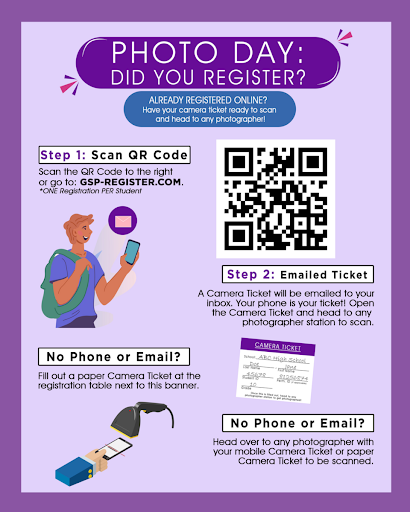
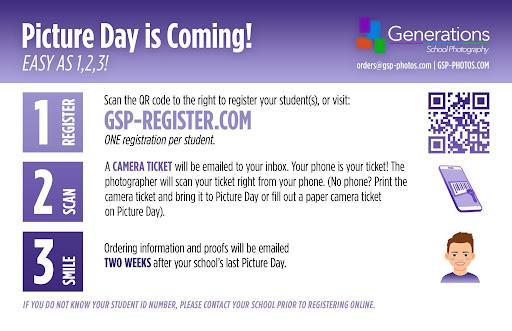
Photos are handled by Generations School Photography (GSP). Registering in advance — one registration per student — speeds up check-in on Picture Day.
- Register — scan the QR code below or visit GSP-Register.com.
- Scan — a Camera Ticket is emailed to your inbox. Your phone is your ticket — the photographer scans it right from your screen. No phone? Print the ticket, or fill out a paper Camera Ticket on Picture Day.
- Smile — ordering information and proofs are emailed two weeks after your school's last Picture Day.
If you don't know your student's ID number, please contact the school before registering online.

Seniors: Schedule Your Senior Photo
Webstore Purchases: PE Clothes, Athletic Season Pass, & ASB Package
Order through the Leigh Webstore — new accounts click HELP if needed, then Select School → Leigh.
- PE Clothes — once ordered, PE clothes will be picked up by the student in their PE classes.
- Athletic Season Pass — gets four non-student family members into every home game.
- ASB Package — includes entry to all athletic events (home & away, except CCS), a ticket for the Welcome Back Dance, dance discounts, a yearbook ($90 value), a class shirt to wear to all rallies and spirit days, and free entry to all sporting events. The higher priced package comes with hoodie and sweatpants. ASB packages can also be purchased in person at the student store, with a check made out to Leigh High School ($175/$225). Deadline to purchase: September 5th. 100% of all proceeds fund the student body with lunchtime activities, games, free food, cultural activities, and club support.
Fall Athletics: Tryouts & Health Screenings
All athletes: purchase a Leigh Gate Pass on the Athletics page →
Campus Life
9th Grade Student Orientation (Link Crew)
The 9th grade Link Crew Orientation is Wednesday, August 5th, 8:00 am–1:00 pm. Lunch is provided. Students will have their school photo taken and receive their school ID card at orientation — this photo also appears in the yearbook (see Picture Days above for more).
Link Crew is a community-building and transition program that helps incoming students adjust to high school. Over 100 Junior and Senior Link Crew Leaders complete a two-day summer training to prepare to welcome new students and help them feel part of the Longhorn family.
During orientation, Link Crew Leaders guide small groups through games and community-building activities so incoming students can meet their peers, and lead a campus tour so students know where their classes will be.
Students will be contacted by their Link Leader before the event with instructions.
Bell Schedule

School Calendars
Click on the calendar icon at the top of the website to view the school calendars:

- A/B Calendar — Leigh uses an A/B block schedule, where classes meet every other day for an extended period.
- Events Calendar — upcoming activities and events at Leigh, a great resource for current students and families.
- Academic Calendar — key dates for the Fall and Spring semesters: first and last day of class, finals days, professional development days, holidays, and breaks.
Note: To subscribe to the online A/B Calendar (which includes Collaboration, Minimum days, and holidays) so that it is connected to your personal calendar:
- Click on this link to view the online A/B Calendar.
- Click on "Subscribe."
Chromebooks
Campus Map
Lockers
Drop Off / Pick Up & Parking
School Meals / Lunch — Free to All Students
Staff Directory / Teacher Bios

Communication & Support
Student & Parent Handbook
Parent Portals — Aeries, Canvas, ParentSquare & Naviance
Aeries holds official records like report cards and attendance. Canvas has assignments and grades. ParentSquare is for school-wide communication. Naviance covers college and career planning. Learn more about each portal →
Parent Organizations at Leigh
Staying in the Loop
Who Do I Contact With a Question or Concern?
For classroom or academic concerns, start with the teacher. If it isn't resolved, the next contact depends on the issue:
- Academic issues → Counselor
- Discipline / behavior → Assistant Principal
- Students with an IEP → Case Manager
- Still unresolved → Principal
Other questions:
| Topic | Contact | Location |
|---|---|---|
| Advanced Placement | Assistant Principal | Main Office |
| Alternative School Options | Counselors | Main Office |
| ASB / ID Cards | Activities Director | Activities Office |
| Athletic Team Tryouts | Athletic Director | Athletic Director Office |
| Attendance | Attendance Clerk | Main Office |
| CASSY Therapist | Any Staff | Main Office |
| Change of Address | Assistant Principal | Main Office |
| Checking out of school | Attendance Clerk | Main Office |
| College Admissions | Counselors | Main Office |
| Chromebooks | Computer Technician | Room 82 |
| Dance Tickets / Guest Passes | Activities Director | Activities Office |
| Discipline | Assistant Principal | Main Office |
| Graduation Requirements | Counselors | Main Office |
| Health Services | Health Clerk | Main Office |
| Home & Hospital Instruction | Assistant Principal | Main Office |
| New Student Enrollment | Assistant Principal |
Main Office
|
| Reduced/free lunch program | Health Clerk |
Main Office
|
| Request for Homework | Counselors |
Main Office
|
| Schedule Adjustments | Counselors | Main Office |
| Testing (CAASPP, PSAT, SAT) | Assistant Principals | Main Office |
| Transcripts | Registrar | Main Office |
| Textbooks | Book Clerk | Library |
| SVCTE | Counselors | Main Office |